On scripts and hooks
Over the last few weeks, we have been doing research on the integration of our official distribution packages when installed on a target system. In this context we have been looking at the current uses of alpm-install-scriptlet(5) files and alpm-hooks(5) in around 120 package source repositories (alpm-source-repo(7)) to better understand the underlying functionality and use-cases these two integrations offer and target.
In this article we are going to look at how these two systems work, how Arch Linux is currently using them and attempt to provide suggestions for when to use which.
Learning about alpm-hooks(5) and alpm-install-scriptlet(5) files is helpful for package maintainers and end-users alike to better understand how system updates apply and what to do with data that is not owned by any package.
🤝 Integration
Package installation (on Arch Linux and other distributions) does not only entail the adding and updating of files that belong to a given package, but also the integration of data that is not tracked by the system package manager. For example, this can be the creation of users and groups, the creation of directories and files, the modification of mode and ownership of directories and files, or the creation, updating and deletion of various cache files. As with everything, there are also edge-cases, such as emitting messages on specific version upgrades of a package, disabling of services, migration of data, or changing of users or groups.
2️⃣ The two systems
Currently, two mechanisms exist, that are designed to be used for the manipulation of data not owned by package files:
- alpm-install-scriptlet(5) is a script file that may be contained in an alpm-package(7), but that is not installed to the target system. Instead, pre-defined functions from the script are executed by the package management system around the time of the respective package transaction.
- alpm-hooks(5) are files in a declarative file format, that reside in well-known locations on the target system and that the package management system executes before and after the entirety of specific package transactions are handled.
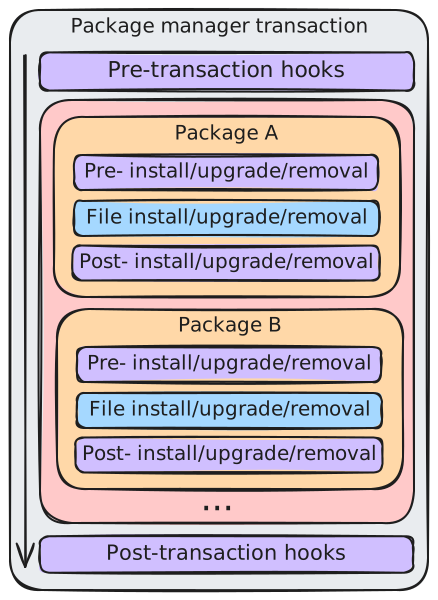
The above graph illustrates a generic package manager transaction (installation, upgrade or removal of several packages).
At the top and bottom of the graph, we see the pre- and post-transaction hooks (in purple), which are run before and after the block of package transactions (in red). These are the alpm-hooks(5).
Each package transaction (in orange) has a section of possible pre- and post- install/upgrade/removal functions (in purple) that are run before and after the respective file transactions (in blue) of a given package. These are the alpm-install-scriptlet(5) files.
Have a look at the transaction example for an in-depth overview of how these files look like and how they behave in a packaging context. Package maintainers are also invited to have a look at the notes for package maintainers for an overview and a few thoughts on current edge-cases and potential solutions for the Arch Linux distribution.
📜 Scripts
Historically, system integration has been achieved using either the PKGBUILD(5) script itself or with the help of an alpm-install-scriptlet(5) file.
An alpm-install-scriptlet(5) offers free-form shell scripting in dedicated functions to be run before or after the installation, upgrade or removal of a specific package. Each function has access to relevant version information available to the specific package transaction, such as the previous and new version of the package.
However, this approach is not without caveats:
- In theory an alpm-install-scriptlet(5) can be written in many types of shell scripting languages. In practice, the shell in use is tied to the build-time configuration of the package manager (Bash for Arch Linux).
- The order in which package files are installed (and in consequence, when the actions of their alpm-install-scriptlet(5) is run) depends on the ordering determined by the package manager for the given transaction (i.e. which package is installed first, when installing a list of packages). A transaction may contain one or many packages.
- An alpm-install-scriptlet(5) has no way of defining what its run-time requirements are (i.e. which executables it needs to call). When it is run, the executables it is calling, or other data required to do its job may not be there (yet).
- To reliably assign directories and files to users, their user IDs and group IDs have to be known during package build time, which effectively means, that they need to be hardcoded.
- The creation or updating of cache files may be done multiple times, or even at the wrong time. When package A provides the tooling for creating an application-specific cache file, and package B and C both provide files for which the cache file needs to be created, then both B and C needed to run the tooling that A provides.
- Only the alpm-install-scriptlet(5) of the particular package in the transaction is considered (not e.g. the one of a previous version). As such, a package maintainer needs to plan ahead for the version that is about to be installed/updated/removed.
🪝 Hooks
In the first release of systemd in 2010, initial support for tmpfiles.d(5) has been released. With it, it became possible to declaratively create, adjust and cleanup directories and files. In 2015, sysusers.d(5) was added in systemd 215 and added the possibility of declaratively adding users and groups. A year later, in 2016, the alpm-hooks(5) feature has been released with pacman(8) 5.0. These three changes allowed for new workflows in which more integration tasks could be run before and after a transaction.
Here, alpm-hooks(5) offer a strictly ordered and timed integration, in which actions can be executed before or after the transaction for package files. An action can define its run-time requirements and can be triggered by changes to packages or paths on the system.
A few things should be noted about alpm-hooks(5):
- They are quite generic, run in the context of the target system and are not aware of version information of specific packages.
- A system administrator may declare their own or disable existing ones using /etc/pacman.d/hooks/.
- As hooks are read from the target system's filesystem, pre-transaction tasks are only available and run once the package is installed, that provides them.
- A post-transaction task is only available and run as long as the package is installed, that provides it.
💡 Use cases
By looking at the alpm-source-repo(7) of around 120 packages, we extrapolated the most common use cases.
alpm-hooks
- Delete cache files in a pre-transaction, when removing a package.
- Create users and groups, using sysusers.d(5) (20-systemd-sysusers.hook runs systemd-sysusers(8) in a post-transaction).
- Create directories, symlinks, files, set ownership, permissions and capabilities using tmpfiles.d(5) in a post-transaction (21-systemd-tmpfiles.hook runs systemd-tmpfiles(8)).
- Create cache files in a post-transaction, when installing or upgrading a package, or when specific file paths change.
- Migrate variable data for a specific package in a post-transaction (e.g. 25-systemd-catalog.hook to update the journalctl(1) catalog).
- Restart or reload systemd system units in a post-transaction.
For this to work, the units requiring reload/restart are e.g. marked as such using systemctl(1) (i.e.
systemctl --runtime set-property <unit> Markers=needs-restart, e.g. in an alpm-install-scriptlet(5) or in a pre-transaction hook) and are then enqueued using 35-systemd-enqueue-marked.hook in a post-transaction task, which reloads/restarts them. See org.freedesktop.systemd1(5) for further details onMarkers.
alpm-install-scriptlet
The most common task in an alpm-install-scriptlet(5) is to display a message to the user when upgrading to a specific version of a package (e.g. to inform them about breaking changes to config or data). However, there are further version-bound use cases. Some or all of the below may also be covered by alpm-hooks(5) (also see notes for package maintainers).
- Stop a systemd system unit (if it is started) (
systemctl stop <unit>). - Globally enable a systemd user unit (
systemctl --global enable <unit>). - Globally re-enable a systemd user unit (
systemctl --global reenable <unit>). - Globally disable a systemd user unit (
systemctl --global disable <unit>). - Enable a systemd system unit (
systemctl enable <unit>) - Disable a systemd system unit (if it is enabled) (
systemctl disable <unit>). - Mark a service for restart (
systemctl set-property <unit> Markers=needs-restart).
🚨 Problems
As with all systems, there are edge cases, as well as unintended and obsolete use cases. Possible solutions to some of them are discussed further in the notes for package maintainers.
In general, it can be noted, that alpm-hooks(5) offer a more centralizable approach to where and how a certain functionality is implemented. Meanwhile, when using an alpm-install-scriptlet(5) per package, functionality has to be implemented over and over again, introducing a lot of boilerplate.
The most common problems stem from package maintainers not being aware of alpm-hooks(5) providing a specific functionality already and thus implementing handling in an alpm-install-scriptlet(5) instead. A few common tasks we found are the creating of files and directories, the changing of file and directory permissions or ownership, the application of custom file attributes (e.g. capabilities(7), setuid(2) or setgid(2)), or the creation of users and groups.
Testing changes to an alpm-install-scriptlet(5) can be rather tricky, because the execution of the functions is only triggered by the specific package transaction (i.e. installation, upgrade or removal).
In some situations it is not possible to reliably trigger these situations (e.g. with a local upgrade using pacman --upgrade).
Changes to alpm-hooks(5) on the other hand are more easy to test, because the administrator location /etc/pacman.d/hooks/ can be used to deploy modifications. On the other hand, alpm-hooks(5) lack the version context of the package they may target, which makes it harder to react to breaking changes in a package, based on a specific version.
In addition, for some use cases (e.g. the systemd package) using alpm-hooks(5) may mean that changes to integral system tooling could be applied too late, leading to potential issues.
🌬️ Discussion
At the time of writing, Arch Linux still relies on both alpm-install-scriptlet(5) files and alpm-hooks(5) to cover common use-cases.
In general, it can be said, that alpm-hooks(5) offer a more modern, declarative and testable approach to actions surrounding package transactions. Nonetheless, they can in some cases proof more limiting than alpm-install-scriptlet(5) files, because they offer no access to version information and may require to rethink existing workflows when using them.
As is, the alpm-install-scriptlet(5) files are not likely to disappear in the near future, because they offer a different, more package specific integration than alpm-hooks(5). However, quite a few current use cases for the scripts can be covered using hooks and it is probably advisable to minimize the custom code in the scripts as much as possible.
Going forward, Arch Linux needs to extend its distribution documentation to make it easier for package maintainers to choose between the two systems and to gain a better overview of what functionality is available already.
Examples
This section offers examples, mentioned throughout the text. These are likely too long or too specific for the casual reader, but potentially very interesting for e.g. package maintainers.
⌨️ Transaction example
To illustrate when exactly alpm-hooks(5) and an alpm-install-scriptlet(5) are run, let's have a look at example package sources, build them as a package, install them, modify the package sources, upgrade the package and finally uninstall the package.
Package sources
We will use the following, simple PKGBUILD file:
# Maintainer: Foobar McFooface <foobar@mcfooface.org>
pkgname=test
pkgver=0.1.0
pkgrel=1
pkgdesc="Tests for install scriptlets and hooks"
arch=(any)
url="https://archlinux.org"
license=(0BSD)
install="$pkgname.install"
source=(
  0BSD.txt
  pre-transaction.hook
  post-transaction.hook
)
sha256sums=('7056c04df17a4e0f0bac9f787f347c9cd892cee6323d1c89528090afd0b934a3'
            '82c9f27667df9ace38b73481b5338ea45b9a9721b32cfe18ad9c06e88ffac028'
            '4973596fd06b5545f2c5e0ed7ac43ee6e8312ff06cb2c76c9d8c79fca29ce43f')

package() {
  install -vDm 644 {pre,post}-transaction.hook -t "$pkgdir/usr/share/libalpm/hooks/"
  install -vDm 644 LICENSE -t "$pkgdir/usr/share/licenses/$pkgname/"
}
The 0BSD.txt license file explains how these example files can be reused and should therefore be added to have a valid package.
The following is the pre-transaction.hook which is part of the package data and will be installed to the filesystem of a target system when using the package we are about to build.
In the Description of its Action this alpm-hooks(5) file hardcodes the particular alpm-pkgver and alpm-pkgrel of the package it is made available in.
[Trigger]
Operation = Install
Operation = Upgrade
Operation = Remove
Target = test
Type = Package

[Action]
Depends = bash
Description = Running the pre-transaction task for the test package 0.1.0-1...
Exec = /usr/bin/bash -c 'printf "This is a pre-transaction!\n"'
When = PreTransaction
Similar to the previous file, the post-transaction.hook file would also be installed to the filesystem of the target system and also hardcodes the particular alpm-pkgver and alpm-pkgrel of the package it is made available in the Description of its Action.
[Trigger]
Operation = Install
Operation = Upgrade
Operation = Remove
Target = test
Type = Package

[Action]
Depends = bash
Description = Running the post-transaction hook for test package 0.1.0-1...
Exec = /usr/bin/bash -c 'printf "This is a post-transaction!\n"'
When = PostTransaction
Last, but not least, we have the test.install, which is the [alpm-install-scriplet] of the test package.
Here, we also hardcode the alpm-pkgver and alpm-pkgrel of the specific package this file will reside in and print this information as a simple message using the pre-defined functions pre_install, pre_upgrade, pre_remove, post_install, post_upgrade and post_remove.
#!/usr/bin/bash

pre_install() {
  # arg 1:  the new package version
  printf 'Running the pre_install function for test package 0.1.0-1 (new package version: %s)\n' "$1"
}

post_install() {
  # arg 1:  the new package version
  printf 'Running the post_install function for test package 0.1.0-1 (new package version: %s)\n' "$1"
}

pre_upgrade() {
  # arg 1:  the new package version
  # arg 2:  the old package version
  printf 'Running the pre_upgrade function for test package 0.1.0-1 (new (%s) and old (%s) package version)\n' "$1" "$2"
}

post_upgrade() {
  # arg 1:  the new package version
  # arg 2:  the old package version
  printf 'Running the post_upgrade function for test package 0.1.0-1 (new (%s) and old (%s) package version)\n' "$1" "$2"
}

pre_remove() {
  # arg 1:  the old package version
  printf 'Running the pre_remove function for test package 0.1.0-1 (old package version: %s)\n' "$1"
}

post_remove() {
  # arg 1:  the old package version
  printf 'Running the post_remove function for test package 0.1.0-1 (old package version: %s)\n' "$1"
}
Building the package
We assume this package is now built using pkgctl(1): pkgctl build.
Installing the package
On first installation, we can see the following:
# pacman --upgrade --noprogressbar --noconfirm test-0.1.0-1-any.pkg.tar.zst
loading packages...
resolving dependencies...
looking for conflicting packages...

Packages (1) test-0.1.0-1

Total Installed Size:  0.00 MiB

:: Proceed with installation? [Y/n]
checking keyring...
checking package integrity...
loading package files...
checking for file conflicts...
checking available disk space...
:: Processing package changes...
installing test...
Running the pre_install function for test package 0.1.0-1 (new package version: 0.1.0-1)
Running the post_install function for test package 0.1.0-1 (new package version: 0.1.0-1)
:: Running post-transaction hooks...
(1/2) Arming ConditionNeedsUpdate...
(2/2) Running the post-transaction hook for test package 0.1.0-1...
This is a post-transaction!
The pre- and post-install functions of the alpm-install-scriptlet(5) and the post-transaction action of the alpm-hooks(5) are run.
Modifying the package sources
As a follow-up, we want to upgrade the package, by increasing its alpm-pkgrel.
We modify the alpm-hooks(5) as well as the alpm-install-scriptlet(5) to now hardcode an updated alpm-pkgrel (1 -> 2) in their respective messages.
This helps us identify which system triggers what message from which package version.
[Trigger]
Operation = Install
Operation = Upgrade
Operation = Remove
Target = test
Type = Package

[Action]
Depends = bash
Description = Running the pre-transaction hook for test package 0.1.0-2...
Exec = /usr/bin/bash -c 'printf "This is a pre-transaction!\n"'
When = PreTransaction[Trigger]
Operation = Install
Operation = Upgrade
Operation = Remove
Target = test
Type = Package
[Action]
Depends = bash
Description = Running the post-transaction hook for test package 0.1.0-2...
Exec = /usr/bin/bash -c 'printf "This is a post-transaction!\n"'
When = PostTransaction#!/usr/bin/bash
pre_install() {
# arg 1: the new package version
printf 'Running the pre_install function for test package 0.1.0-2 (new package version: %s)\n' "$1"
}
post_install() {
# arg 1: the new package version
printf 'Running the post_install function for test package 0.1.0-2 (new package version: %s)\n' "$1"
}
pre_upgrade() {
# arg 1: the new package version
# arg 2: the old package version
printf 'Running the pre_upgrade function for test package 0.1.0-2 (new (%s) and old (%s) package version)\n' "$1" "$2"
}
post_upgrade() {
# arg 1: the new package version
# arg 2: the old package version
printf 'Running the post_upgrade function for test package 0.1.0-2 (new (%s) and old (%s) package version)\n' "$1" "$2"
}
pre_remove() {
# arg 1: the old package version
printf 'Running the pre_remove function for test package 0.1.0-2 (old package version: %s)\n' "$1"
}
post_remove() {
# arg 1: the old package version
printf 'Running the post_remove function for test package 0.1.0-2 (old package version: %s)\n' "$1"
}Rebuilding the package
After changing the sources, we rebuild the package with an increased alpm-pkgrel (1 -> 2) using pkgctl build --update-checksums --rebuild.
Upgrading the package
When upgrading the package, we can observe the following output:
# pacman --upgrade --noprogressbar --noconfirm test-0.1.0-2-any.pkg.tar.zst
loading packages...
resolving dependencies...
looking for conflicting packages...

Packages (1) test-0.1.0-2

Total Installed Size:  0.00 MiB
Net Upgrade Size:      0.00 MiB

:: Proceed with installation? [Y/n]
checking keyring...
checking package integrity...
loading package files...
checking for file conflicts...
checking available disk space...
:: Running pre-transaction hooks...
(1/1) Running the pre-transaction hook for test package 0.1.0-1...
This is a pre-transaction!
:: Processing package changes...
upgrading test...
Running the pre_upgrade function for test package 0.1.0-2 (new (0.1.0-2) and old (0.1.0-1) package version)
Running the post_upgrade function for test package 0.1.0-2 (new (0.1.0-2) and old (0.1.0-1) package version)
:: Running post-transaction hooks...
(1/2) Arming ConditionNeedsUpdate...
(2/2) Running the post-transaction hook for test package 0.1.0-2...
This is a post-transaction!
First, the pre-transaction tasks of the alpm-hooks(5) in the test package version 0.1.0-1, then the pre- and post-upgrade functions of the alpm-install-scriptlet(5) in the test package version 0.1.0-2 and finally the post-transaction tasks of the alpm-hooks(5) in test package version 0.1.0-2 are run.
Removing the package
Finally, we remove the package again and can observe the following output:
# pacman --remove --nosave --recursive --noprogressbar --noconfirm test
checking dependencies...

Packages (1) test-0.1.0-2

Total Removed Size:  0.00 MiB

:: Do you want to remove these packages? [Y/n]
:: Running pre-transaction hooks...
(1/1) Running the pre-transaction hook for test package 0.1.0-2...
This is a pre-transaction!
:: Processing package changes...
removing test...
Running the pre_remove function for test package 0.1.0-2 (old package version: 0.1.0-2)
Running the post_remove function for test package 0.1.0-2 (old package version: 0.1.0-2)
:: Running post-transaction hooks...
(1/1) Arming ConditionNeedsUpdate...
The pre-transaction task of the alpm-hooks(5) and the pre- and post-remove functions of the alpm-install-scriptlet(5) are run.
📓 Notes for package maintainers
This section is meant as "food for thought" for package maintainers. As such, it is probably not that interesting for the casual reader.
After looking at the alpm-source-repo(7) of packages with an alpm-install-scriptlet(5) and evaluating their use cases, it became clear that many of the current actions can be replaced with more generic alpm-hooks(5).
Documentation
At the time of writing, we are missing a documented ordering system for alpm-hooks(5) in the distribution to establish ranges of number prefixes for specific tasks. Having such documentation would allow us to work with alpm-hooks(5) more robustly. In addition, providing a central place for documenting the sets of functionality offered by common hooks would be useful to package maintainers to reuse them and extend them.
Adding documentation around the use cases for alpm-hooks(5) or alpm-install-scriptlet(5) files would be beneficial for package maintainers to reduce future boilerplate code and arrive at a more streamlined integration for the distribution.
Testing
Currently, it is very hard to test changes. Also, test integration to observe changes to central hooks is currently not yet available to the package maintainers (e.g. to test changes to installation, upgrade or removal behavior).
Edge cases
Arch Linux currently still employs a number of edge cases for which different approaches can potentially be used. The below is a non-exhaustive list:
- Changes to
/etc/shells(shells(5)) by adding an entry to it usingsedin an alpm-install-scriptlet(5). Solution: Use a drop-in based approach instead (see shadow#587, util-linux#1857 and pam#498) , as the relevant packages making use of it understand this already (unfortunately glibc doesn't fully it seems). - Changes to an already existing system user (e.g. switch to another
$HOME) in an alpm-install-scriptlet(5) file for a specific version of a package. The integration via sysusers.d(5) only offers the creation of users and groups, but not their modification afterwards. Solution: A package specific, post-transaction task in an alpm-hooks(5) file, only relying on circumstantial information (e.g. the current$HOMEof the user) and not a particular version of the package. - Stopping, reloading or restarting systemd user units of logged-in users in an alpm-install-scriptlet(5) for a specific version of a package. Solution: Logic similar to the reload/restart functionality for systemd system units, but for systemd user units (first marking them for restart, then enqueuing them in a similar fashion to 35-systemd-enqueue-marked.hook).
- Enabling and disabling of systemd system and user units in an alpm-install-scriptlet(5) (e.g. by calling
systemctl enable <unit>orsystemctl enable --global <unit>). Solution: Vendor enabling (i.e. symlinking of the specific unit to the respective target in/usr/lib/systemd/system/or/usr/lib/systemd/user/) or using systemd.preset(5) files, which allow for declarative enabling and disabling of system and user units and add a new alpm-hooks(5) file to callsystemctl preset. - Load a kernel module in an alpm-install-scriptlet(5) after installation of a package. Solution: Add an alpm-hooks(5) file which restarts systemd-modules-load(8) upon changes to the modules-load.d(5) configuration directories.
- Copy a systemd system unit file from vendor dir to runtime dir.
This is a very rare edge case but unfortunately may need to be done for critical system services (e.g. when the
Typeoption changes in a [systemd.service]). To prevent a changed interface being used with an already running process (possibly leading to a crash), the previous service file is copied to the vendor dir/run/systemd/system/to temporarily retain old reload behavior, before asystemctl daemon-reloadis done. It is yet unclear whether there is an alpm-hooks(5) shaped alternative to this approach, as the override must be deployed, before the package files are upgraded and before systemd tasks are run.
Further, there are systemd-specific edge cases, that are currently handled in the alpm-install-scriptlet(5) file for the systemd package and could potentially be moved to pre- and post-transaction tasks in alpm-hooks(5). Doing so would require coordination with other tasks relevant to the systemd state.
- Re-executing the systemd manager.
Upon upgrade of systemd the manager process itself must be re-executed (
systemctl --system daemon-reexec). - Reloading of the user services.
Upon upgrade of systemd the systemd system services for each user need to be reloaded (
systemctl reload 'user@*.service'). - Marking all systemd related services for reload/restart.
- Update the message catalog index for systemd-journald(8).
This is necessary upon upgrade of systemd, or changes to catalog files (
journalctl --update-catalog). - Initialize the machine-id(5) in
/etc/machine-idif it hasn't been initialized yet (systemd-machine-id-setup(1)).